 Tron
Get in touch
Structural models your whole team can work on.
Bring engineers, scripts and AI agents together on a single model. Explore design options, review every change and run code checks in one place.
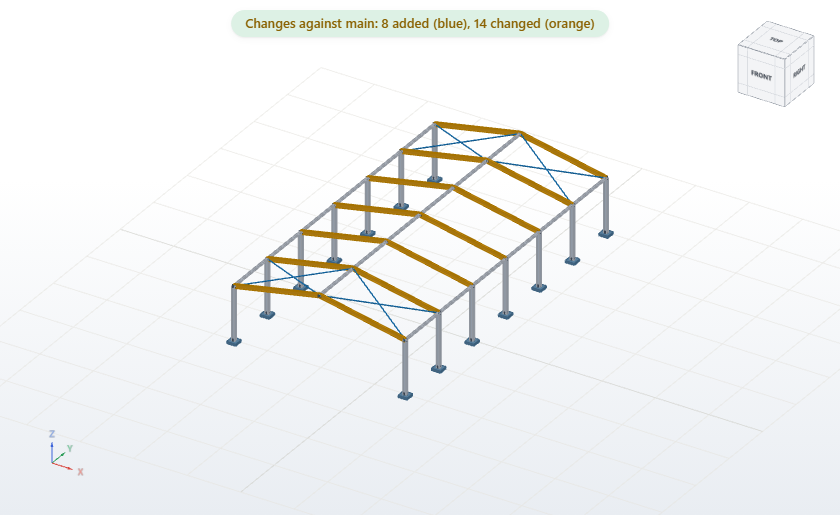
Rafters IPE 360, roof bracing
8 added 14 changed IPE400 → IPE360
BKApproved
Merge into mainTry IPE 360 for the rafters on a new branch, run the analysis and tell me what changes.
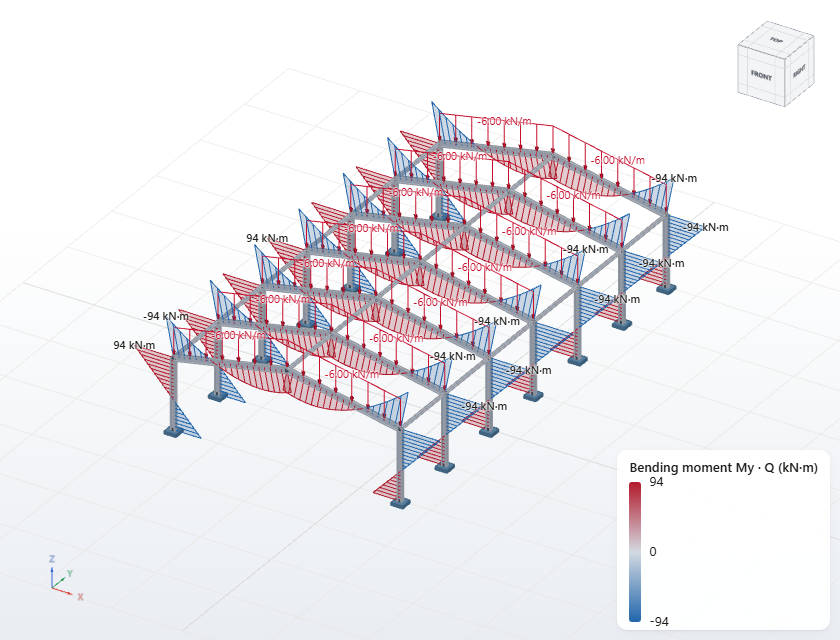
I created the branch lighter-roof and changed 14 rafters to IPE 360. The analysis has finished: the largest bending moment is 97 kN·m.
Good. Open a merge request so Ben can review it.
Done: merge request #12, Rafters IPE 360. Ben can compare the changes in the 3D viewer.
from tron_sdk import Project

hall = Project("https://tron.example.ch/projects/hall",
               branch="lighter-roof")

# Change the rafters on a branch
rafters = hall.get("structural.member",
                   where={"tag": "rafter"})
hall.update("structural.member",
            [{"ref": r["id"], "section": "IPE 360"}
             for r in rafters])

# Keep it as a commit colleagues can review
hall.commit("Rafters IPE 360")
# Change a rafter on a branch
curl -X POST https://tron.example.ch/projects/hall/api/update \
  -H "Authorization: Bearer $TRON_TOKEN" \
  -H "Content-Type: application/json" \
  -d '{"branch": "lighter-roof",
       "element": "structural.member",
       "changes": [{"ref": "R12", "section": "IPE 360"}]}'

# Keep it as a commit colleagues can review
curl -X POST https://tron.example.ch/projects/hall/api/commit \
  -H "Authorization: Bearer $TRON_TOKEN" \
  -H "Content-Type: application/json" \
  -d '{"branch": "lighter-roof", "message": "Rafters IPE 360"}'
Your entire model, in one place
Replace scattered files and calculation sheets with a single shared project for your whole team.
Branches
Explore design options side by side. The main model stays untouched until you decide to merge.
History
See who changed what and when, down to a single member, and return to any earlier state.
Reviews
Propose changes for review. Colleagues inspect them in 3D, comment and approve.
Code checks
Check your design against SIA 260 and SIA 263 at any stage of the model.
Optimisation
Let the optimiser propose cross-sections, then review them like any other change.
Automation
Automate your work with the Python SDK or REST API, and export a project with its full history at any time.
From first idea to final submission
The workflow of modern software teams, adapted for structural engineering.
Branch
Start a variant without touching the main model.
Change
Edit the model yourself, by script or with an AI agent.
Review
Compare versions in 3D, review the checks and discuss them in the browser.
Merge
Bring the result into the main model and tag it for submission.
Works with your AI tools and scripts
Hosted by us, or by you
Every organisation gets its own dedicated Tron server, with the same features either way. Choose what suits you best.
We host it for you
For individuals and small businesses
Nothing to install or maintain. We run your server, keep it up to date and take care of backups, so you can simply sign in and start working.
Host it yourself
For larger companies
Run Tron on your own infrastructure, managed by your IT team. Your data stays in your hands.
Get in touch
Tell us about your team and how you work, and we'll find the right setup together.
Contact usMusterstrasse 1
8000 Zürich
hello@tron.example
+41 00 000 00 00